Step 1: Create an FCC Username Account
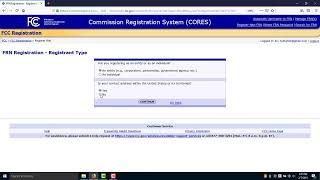
Before applying for a GMRS license, you must create an account with the FCC's Commission Registration System (CORES).
- Visit the FCC Registration System website.
- Create a new username and password.
- Enter your personal information as requested.
- Once registration is complete, the FCC will issue you a unique FCC Registration Number (FRN).
Your FRN serves as your identifier for all FCC licensing activities.
Step 2: Log Into the FCC Universal Licensing System (ULS)
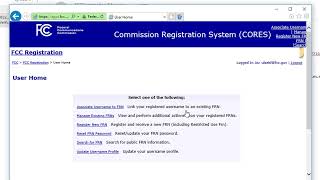
After obtaining your FRN, log into the FCC's Universal Licensing System (ULS).
The Universal Licensing System is the FCC's online portal for applying for, managing, renewing, and downloading licenses. All GMRS license transactions are handled through ULS.
Using your FRN and password:
- Sign in to the FCC ULS portal.
- Select "Apply for a New License."
If you are having trouble navigating the FCC CORES system and securing your FRN number, the FCC offers these tutorial videos to assist. A guide is also provided in the files section located at the bottom of this page.
Step 3: Select the Correct License Type
When prompted to choose a radio service, select:
ZA – General Mobile Radio Service (GMRS)
The service code ZA is the FCC designation for GMRS licenses.
After selecting ZA, continue through the application screens and verify your information.
Step 4: Submit Your Application
Review your application carefully and certify that all information is accurate.
Once submitted, the FCC will direct you to the payment system where you will pay the required $35 application fee.
GMRS License Facts
- License Fee: $35
- License Term: 10 Years
- Exam Required: No
- Covers Immediate Family Members: Yes
Step 5: Wait for License Grant
In many cases, GMRS licenses are granted within a short period after payment is processed.
You can monitor the status of your application by logging into the FCC Universal Licensing System and viewing your license records.
Step 6: Download Your License
Once your application has been approved, the FCC will issue your GMRS license electronically.
Important Notice: The FCC no longer mails paper copies of licenses.
After your license is granted, you must:
- Log into the FCC Universal Licensing System (ULS).
- Locate your GMRS license record.
- Download and save a PDF copy of your license for your records.
Many GMRS operators choose to save a digital copy on their phone and print a paper copy for home use.
You're Ready to Get On the Air!
Once your GMRS license has been granted, you may begin operating on GMRS frequencies in accordance with FCC regulations. Your license also authorizes eligible immediate family members to use GMRS under your license privileges.
With a valid GMRS license, a properly programmed radio, and access to local repeaters such as the Blackskye Community Radio Association repeater system, you'll be ready to participate in community communications, family activities, and emergency preparedness operations.